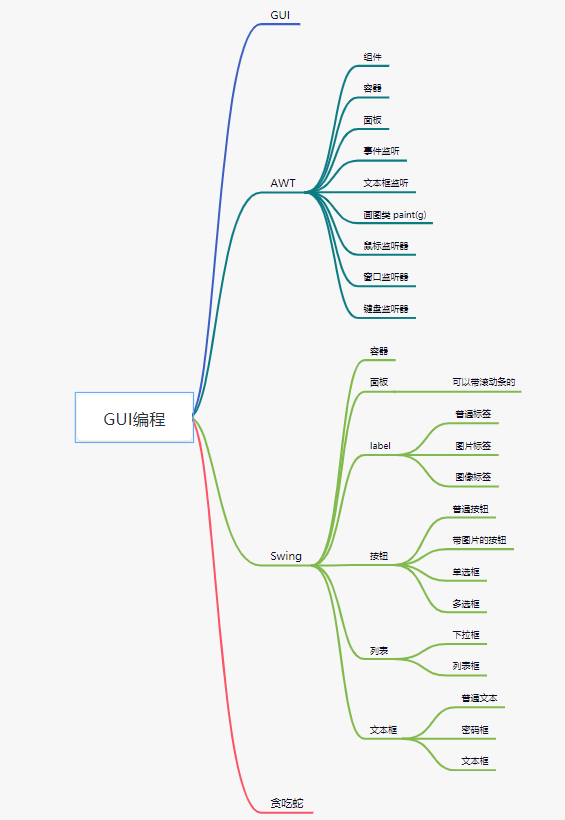
130. GUI编程

GUI简介

简介

GUI核心开发技术:Swing、AWT
不流行原因:

  • 界面不美观
  • 需要 jre 环境

为什么要学习?

  1. 可以写出自己心中想要的小工具
  2. 工作时候,也可能小维护到 swing 界面,概率极小
  3. 了解MVC架构,了解监听

AWT

AWT介绍

  1. 包含了很多类和接口用于GUI编程!GUI:图形用户界面
  2. 元素:窗口,按钮,文本框
  3. java.awt

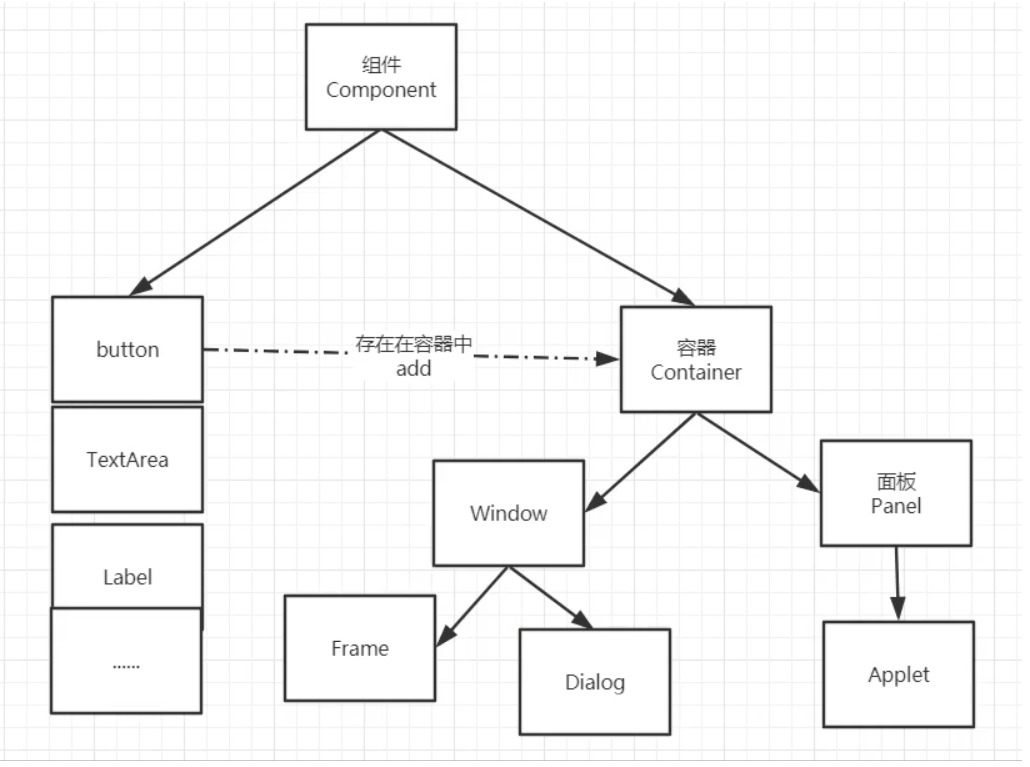
组件和容器

Frame

1
2
3
4
5
6
7
8
9
10
11
12
13
14
15
16
17
18
19
20
21
22
23
24
25
import java.awt.*;

/**
* @author QeuroIzo
* @date 2021-03-03 17:04
* @TODO GUI的第一个界面
* @since
*/
public class TestFrame {
public static void main(String[] args) {
// Frame 看源码
Frame frame = new Frame("我的第一个Java图像界面窗口");
// 设置可见性
frame.setVisible(true);
// 设置大小
frame.setSize(400, 400);
frame.setBackground(new Color(0, 255, 0));
// 设置弹出的初始位置
frame.setLocation(200, 200);
// 设置大小固定
frame.setResizable(false);

}

}

尝试封装

1
2
3
4
5
6
7
8
9
10
11
12
13
14
15
16
17
18
19
20
21
22
23
24
25
26
27
28
29
30
31
package com.kuangstudy.gui.module3;

import java.awt.*;

/**
* @author QeuroIzo
* @date 2021-03-03 17:24
* @TODO
* @since
*/
public class TestFrame2 {
public static void main(String[] args) {
MyFrame myFrame1 = new MyFrame(100, 100, 200, 200, Color.BLUE);
MyFrame myFrame2 = new MyFrame(300, 100, 200, 200, Color.YELLOW);
MyFrame myFrame3 = new MyFrame(100, 300, 200, 200, Color.RED);
MyFrame myFrame4 = new MyFrame(300, 300, 200, 200, Color.MAGENTA);

}
}

class MyFrame extends Frame {
// 可能存在多个窗口,需要一个计数器
static int id = 0;
public MyFrame(int x, int y, int w, int h, Color color) {
super("MyFrame" + (++id));
setVisible(true);
setBounds(x, y, w, h);
setBackground(color);

}
}

面板Panel

Panel 可以看成是一个空间,但是不能单独存在,需要放在 Frame

解决了窗口关闭事件

1
2
3
4
5
6
7
8
9
10
11
12
13
14
15
16
17
18
19
20
21
22
23
24
25
26
27
28
29
30
31
32
33
34
35
36
37
38
39
40
41
42
43
44
45
46
package com.kuangstudy.gui.module4;

import java.awt.*;
import java.awt.event.WindowAdapter;
import java.awt.event.WindowEvent;

/**
* @author QeuroIzo
* @date 2021-03-03 18:38
* @TODO
* @since
*/
public class TestPanel1 {
public static void main(String[] args) {
Frame frame = new Frame();
frame.setTitle("hello");
// 布局的概念
Panel panel = new Panel();

// 设置布局
frame.setLayout(null);
// 坐标
frame.setBounds(300, 300, 500, 500);
frame.setBackground(new Color(0, 255, 0));
// panel 设置坐标,相对位置
panel.setBounds(50, 50, 400, 400);
panel.setBackground(new Color(255, 0, 0));

// frame 添加 panel
frame.add(panel);
// 设置可见
frame.setVisible(true);

// 监听事件:监听窗口关闭事件 System.exit(0)
// 适配器模式:
frame.addWindowListener(new WindowAdapter() {
// 窗口点击关闭的时候需要做的事情
@Override
public void windowClosing(WindowEvent e) {
// 结束程序
System.exit(0);

}
});
}
}

布局管理器

  • 流式布局
  • 东西南北中
  • 表格布局

流式布局

1
2
3
4
5
6
7
8
9
10
11
12
13
14
15
16
17
18
19
20
21
22
23
24
25
26
27
28
29
30
31
package com.kuangstudy.gui.module5;

import java.awt.*;

/**
* @author QeuroIzo
* @date 2021-03-03 19:01
* @TODO 流式布局
* @since
*/
public class TestFlowLayout1 {
public static void main(String[] args) {
Frame frame = new Frame();

// 组件-按钮
Button button1 = new Button("Button1");
Button button2 = new Button("Button2");
Button button3 = new Button("Button3");

// 设置为流式布局
// frame.setLayout(new FlowLayout()); // 默认center
// frame.setLayout(new FlowLayout(FlowLayout.LEFT));
frame.setLayout(new FlowLayout(FlowLayout.RIGHT));
frame.setSize(200, 200);
// 把按钮添加上去
frame.add(button1);
frame.add(button2);
frame.add(button3);
frame.setVisible(true);
}
}

东西南北中

1
2
3
4
5
6
7
8
9
10
11
12
13
14
15
16
17
18
19
20
21
22
23
24
25
26
27
28
29
30
31
32
33
package com.kuangstudy.gui.module5;

import java.awt.*;

/**
* @author QeuroIzo
* @date 2021-03-03 21:02
* @TODO 东西南北中
* @since
*/
public class TestBorderLayout {
public static void main(String[] args) {
Frame frame = new Frame("Test");

Button east = new Button("East");
Button west = new Button("West");
Button south = new Button("South");
Button north = new Button("North");
Button center = new Button("Center");

frame.add(east, BorderLayout.EAST);
frame.add(west, BorderLayout.WEST);
frame.add(south, BorderLayout.SOUTH);
frame.add(north, BorderLayout.NORTH);
frame.add(center, BorderLayout.CENTER);

frame.setSize(200, 200);
frame.setVisible(true);


}
}

表格布局

1
2
3
4
5
6
7
8
9
10
11
12
13
14
15
16
17
18
19
20
21
22
23
24
25
26
27
28
29
30
31
32
33
34
35
36
package com.kuangstudy.gui.module5;

import java.awt.*;

/**
* @author QeuroIzo
* @date 2021-03-03 21:20
* @TODO
* @since
*/
public class TestGridLayout {
public static void main(String[] args) {
Frame frame = new Frame("GridLayout");

Button btn1 = new Button("btn1");
Button btn2 = new Button("btn2");
Button btn3 = new Button("btn3");
Button btn4 = new Button("btn4");
Button btn5 = new Button("btn5");
Button btn6 = new Button("btn6");

frame.setLayout(new GridLayout(3, 2));
frame.add(btn1);
frame.add(btn2);
frame.add(btn3);
frame.add(btn4);
frame.add(btn5);
frame.add(btn6);

// java函数:自动布局
frame.pack();
frame.setSize(300, 300);
frame.setVisible(true);

}
}

练习

切记直接动手

正常的方式:构思(80%) -> 代码(20%)

1
2
3
4
5
6
7
8
9
10
11
12
13
14
15
16
17
18
19
20
21
22
23
24
25
26
27
28
29
30
31
32
33
34
35
36
37
38
39
40
41
42
43
44
45
46
47
48
49
50
51
package com.kuangstudy.gui.module6;

import java.awt.*;

/**
* @author QeuroIzo
* @date 2021-03-03 21:32
* @TODO
* @since
*/
public class TestDemo {
public static void main(String[] args) {
Frame frame = new Frame("表格布局测试");
frame.setLayout(new GridLayout(2, 3));

Panel panelUp = new Panel();
panelUp.setLayout(new GridLayout(2, 1));
Panel panelDown = new Panel(new GridLayout(2, 2));
Button btn1 = new Button("btn");
Button btn2 = new Button("btn");
Button btn3 = new Button("btn");
Button btn4 = new Button("btn");
Button btn5 = new Button("btn");
Button btn6 = new Button("btn");
Button btn7 = new Button("btn");
Button btn8 = new Button("btn");
Button btn9 = new Button("btn");
Button btn10 = new Button("btn");

// panelUp 添加 btn
panelUp.add(btn2);
panelUp.add(btn3);
// panelDown 添加 Btn
panelDown.add(btn6);
panelDown.add(btn7);
panelDown.add(btn8);
panelDown.add(btn9);

frame.add(btn1);
frame.add(panelUp);
frame.add(btn4);
frame.add(btn5);
frame.add(panelDown);
frame.add(btn10);
frame.pack();

frame.setBounds(300, 300, 500, 400);
frame.setBackground(Color.BLUE);
frame.setVisible(true);
}
}

总结

  1. Frame 是一个顶级窗口
  2. Panel 无法单独显示,必须添加到某个容器中
  3. 布局管理器
    1. 流式
    2. 东西南北中
    3. 表格
  4. 大小、定位、背景颜色、可见性、监听

事件监听

事件监听:当某个事情发生的时候,干什么?

1
2
3
4
5
6
7
8
9
10
11
12
13
14
15
16
17
18
19
20
21
22
23
24
25
26
27
28
29
30
31
32
33
34
35
36
37
38
39
40
41
42
43
44
45
46
47
48
49
50
51
52
53
54
55
package com.kuangstudy.gui.module7;

import java.awt.*;
import java.awt.event.ActionEvent;
import java.awt.event.ActionListener;
import java.awt.event.WindowAdapter;
import java.awt.event.WindowEvent;

/**
* @author QeuroIzo
* @date 2021-03-05 15:39
* @TODO
* @since
*/
public class TestActionEvent {
public static void main(String[] args) {
// 按下按钮是,触发一些事件
Frame frame = new Frame();
// frame.
Button button = new Button("button");
// 因为 addActionListener() 需要一个 ActionListener,所以我们需要构造一个ActionListener
MyActionListener myActionListener = new MyActionListener();
button.addActionListener(myActionListener);

frame.add(button, BorderLayout.CENTER);
frame.pack();
frame.setVisible(true);
windowClose(frame);

}

/**
* 关闭窗体的事件
* @param frame Frame
*/
private static void windowClose(Frame frame) {
frame.addWindowListener(new WindowAdapter() {
@Override
public void windowClosing(WindowEvent e) {
System.exit(0);
}
});
}
}

/**
* 事件监听
*/
class MyActionListener implements ActionListener {

@Override
public void actionPerformed(ActionEvent e) {
System.out.println("aaa");
}
}

多个按钮共享一个事件

1
2
3
4
5
6
7
8
9
10
11
12
13
14
15
16
17
18
19
20
21
22
23
24
25
26
27
28
29
30
31
32
33
34
35
36
37
38
39
40
41
42
43
44
45
46
package com.kuangstudy.gui.module7;

import java.awt.*;
import java.awt.event.ActionEvent;
import java.awt.event.ActionListener;

/**
* @author QeuroIzo
* @date 2021-03-05 16:20
* @TODO
* @since
*/
public class TestActionEvent2 {
public static void main(String[] args) {
// 两个按钮,实现同一个监听
// 开始-停止
Frame frame = new Frame("开始-停止");
Button beginButton = new Button("start");
Button stopButton = new Button("stop");

// 可以显示的定义触发会返回的命令,如果不显示定义,则会走默认的只
// 可以多个按钮只写一个监听类
stopButton.setActionCommand("button-stop");
MyMonitor myMonitor = new MyMonitor();
beginButton.addActionListener(myMonitor);
stopButton.addActionListener(myMonitor);

frame.add(beginButton, BorderLayout.NORTH);
frame.add(stopButton, BorderLayout.SOUTH);

frame.pack();
frame.setVisible(true);


}
}

class MyMonitor implements ActionListener {

@Override
public void actionPerformed(ActionEvent e) {
// e.getActionCommand() 获得按钮的信息
System.out.println("按钮被点击了:msg=>" + e.getActionCommand());

}
}

输入框 TextField、监听

main方法里面只有一行代码:启动

1
2
3
4
5
6
7
8
9
10
11
12
13
14
15
16
17
18
19
20
21
22
23
24
25
26
27
28
29
30
31
32
33
34
35
36
37
38
39
40
41
42
43
44
45
46
47
package com.kuangstudy.gui.module8;

import java.awt.*;
import java.awt.event.ActionEvent;
import java.awt.event.ActionListener;

/**
* @author QeuroIzo
* @date 2021-03-05 16:32
* @TODO
* @since
*/
public class TestTextField {
public static void main(String[] args) {
// 启动
new MyFrame();
}
}

class MyFrame extends Frame {
public MyFrame() {
TextField textField = new TextField();
add(textField);
// 监听这个文本框输入的文字
MyActionListener myActionListener = new MyActionListener();
// 按下enter,就会触发这个输入框的事件
textField.addActionListener(myActionListener);
// 设置替换编码
textField.setEchoChar('*');

setVisible(true);
pack();
}
}

class MyActionListener implements ActionListener {

@Override
public void actionPerformed(ActionEvent e) {
// 获得一些资源,返回的一个对象(为什么Object可以向下转型,有的时候不是会报错吗- runtime error! ClassCastException?)
TextField field = (TextField) e.getSource();
// 获得输入框中的文本
System.out.println(field.getText());
// 设置清空
field.setText("");
}
}

简单计算器、组合+内部类回顾

oop原则:组合大于继承

继承

1
2
3
class A extends B {

}

组合

1
2
3
class A {
public B b;
}

目前代码

1
2
3
4
5
6
7
8
9
10
11
12
13
14
15
16
17
18
19
20
21
22
23
24
25
26
27
28
29
30
31
32
33
34
35
36
37
38
39
40
41
42
43
44
45
46
47
48
49
50
51
52
53
54
55
56
57
58
59
60
61
62
63
64
65
66
67
68
69
70
71
72
73
74
75
76
package com.kuangstudy.gui.module9;

import java.awt.*;
import java.awt.event.ActionEvent;
import java.awt.event.ActionListener;

/**
* @author QeuroIzo
* @date 2021-03-05 18:06
* @TODO 简易计算器
* @since
*/
public class CalculateDemo {
public static void main(String[] args) {
new Calculator();
}
}

/**
* 计算器类
*/
class Calculator extends Frame {
public Calculator() {
// 三个文本框
TextField num1 = new TextField(10);
TextField num2 = new TextField(10);
TextField num3 = new TextField(20);
// 一个按钮
Button button = new Button("=");
button.addActionListener(new MyCalculatorListener(num1, num2, num3));
// 一个标签
Label label = new Label("+");

// 布局
setLayout(new FlowLayout());

// 添加组件
add(num1);
add(label);
add(num2);
add(button);
add(num3);

pack();
setVisible(true);
}
}

/**
* 监听器类
*/
class MyCalculatorListener implements ActionListener {

/**
* 获取三个变量
*/
private TextField num1, num2, num3;
public MyCalculatorListener(TextField num1, TextField num2, TextField num3) {
this.num1 = num1;
this.num2 = num2;
this.num3 = num3;
}

@Override
public void actionPerformed(ActionEvent e) {
// 1. 获得加数和被加数
int n1 = Integer.parseInt(num1.getText());
int n2 = Integer.parseInt(num2.getText());

// 2. 将这个值加法运算后,放到第三个框
num3.setText("" + (n1 + n2));
// 3. 清楚前两个框
num1.setText("");
num2.setText("");
}
}

优化代码

在一个类中调用另一个类的引用

多用组合,最好不要用继承、多态:继承,增强了代码的耦合性;多态,使代码更麻烦,理解容易出错。使用组合的方式把代码拿过来。

1
2
3
4
5
6
7
8
9
10
11
12
13
14
15
16
17
18
19
20
21
22
23
24
25
26
27
28
29
30
31
32
33
34
35
36
37
38
39
40
41
42
43
44
45
46
47
48
49
50
51
52
53
54
55
56
57
58
59
60
61
62
63
64
65
66
67
68
69
70
71
72
73
74
75
76
77
78
79
80
81
82
83
84
package com.kuangstudy.gui.module9;

import java.awt.*;
import java.awt.event.ActionEvent;
import java.awt.event.ActionListener;

/**
* @author QeuroIzo
* @date 2021-03-05 18:06
* @TODO 简易计算器
* @since
*/
public class CalculateDemo {
public static void main(String[] args) {
new Calculator().loadFrame();
}
}

/**
* 计算器类
*/
class Calculator extends Frame {

/**
* 属性
*/
public TextField num1, num2, num3;

/**
* 方法
*/
public void loadFrame() {
// 三个文本框
num1 = new TextField(10);
num2 = new TextField(10);
num3 = new TextField(20);
// 一个按钮
Button button = new Button("=");
// 一个标签
Label label = new Label("+");
button.addActionListener(new MyCalculatorListener(this));

// 布局
setLayout(new FlowLayout());

// 添加组件
add(num1);
add(label);
add(num2);
add(button);
add(num3);

pack();
setVisible(true);
}

}

/**
* 监听器类
*/
class MyCalculatorListener implements ActionListener {

/**
* 获取计算器这个对象,在一个类中组合另外一个类
*/
private Calculator calculator = null;
public MyCalculatorListener(Calculator calculator) {
this.calculator = calculator;
}

@Override
public void actionPerformed(ActionEvent e) {
// 1. 获得加数和被加数
// 2. 将这个值加法运算后,放到第三个框
// 3. 清楚前两个框

int n1 = Integer.parseInt(calculator.num1.getText());
int n2 = Integer.parseInt(calculator.num2.getText());
calculator.num3.setText("" + (n1 + n2));
calculator.num1.setText("");
calculator.num2.setText("");
}
}

完全改造为OOP写法

内部类

  • 更好的包装
1
2
3
4
5
6
7
8
9
10
11
12
13
14
15
16
17
18
19
20
21
22
23
24
25
26
27
28
29
30
31
32
33
34
35
36
37
38
39
40
41
42
43
44
45
46
47
48
49
50
51
52
53
54
55
56
57
58
59
60
61
62
63
64
65
66
67
68
69
70
71
72
73
74
75
76
package com.kuangstudy.gui.module9;

import java.awt.*;
import java.awt.event.ActionEvent;
import java.awt.event.ActionListener;

/**
* @author QeuroIzo
* @date 2021-03-05 18:06
* @TODO 简易计算器
* @since
*/
public class CalculateDemo {
public static void main(String[] args) {
new Calculator().loadFrame();
}
}

/**
* 计算器类
*/
class Calculator extends Frame {

/**
* 属性
*/
private TextField num1, num2, num3;

/**
* 方法
*/
public void loadFrame() {
// 三个文本框
num1 = new TextField(10);
num2 = new TextField(10);
num3 = new TextField(20);
// 一个按钮
Button button = new Button("=");
// 一个标签
Label label = new Label("+");
button.addActionListener(new MyCalculatorListener());

// 布局
setLayout(new FlowLayout());

// 添加组件
add(num1);
add(label);
add(num2);
add(button);
add(num3);

pack();
setVisible(true);
}

/**
* 监听器(内部类)
* 内部类最大的好处,就是可以畅通无阻的访问外部类的属性和方法
*/
private class MyCalculatorListener implements ActionListener {

@Override
public void actionPerformed(ActionEvent e) {
// 1. 获得加数和被加数
// 2. 将这个值加法运算后,放到第三个框
// 3. 清楚前两个框

int n1 = Integer.parseInt(num1.getText());
int n2 = Integer.parseInt(num2.getText());
num3.setText("" + (n1 + n2));
num1.setText("");
num2.setText("");
}
}
}

画笔

1
2
3
4
5
6
7
8
9
10
11
12
13
14
15
16
17
18
19
20
21
22
23
24
25
26
27
28
29
30
31
32
33
34
35
36
37
38
39
40
41
package com.kuangstudy.gui.module10;

import java.awt.*;

/**
* @author QeuroIzo
* @date 2021-03-05 20:18
* @TODO
* @since
*/
public class TestPaint {
public static void main(String[] args) {
new MyPaint().loadFrame();
}
}

class MyPaint extends Frame {

public void loadFrame() {
setBounds(200, 200, 600, 500);
setVisible(true);
}
/**
* 画笔
* @param g
*/
@Override
public void paint(Graphics g) {
// super.paint(g);
// 画笔,需要有颜色,可以画画
g.setColor(Color.RED);
g.drawOval(100, 100, 100, 200);
// 实心圆
g.fillOval(100, 300, 100, 100);

g.setColor(Color.GREEN);
g.fillRect(200, 100, 100, 100);

// 养成习惯:画笔用完,将它还原到最初的颜色。
}
}

鼠标监听

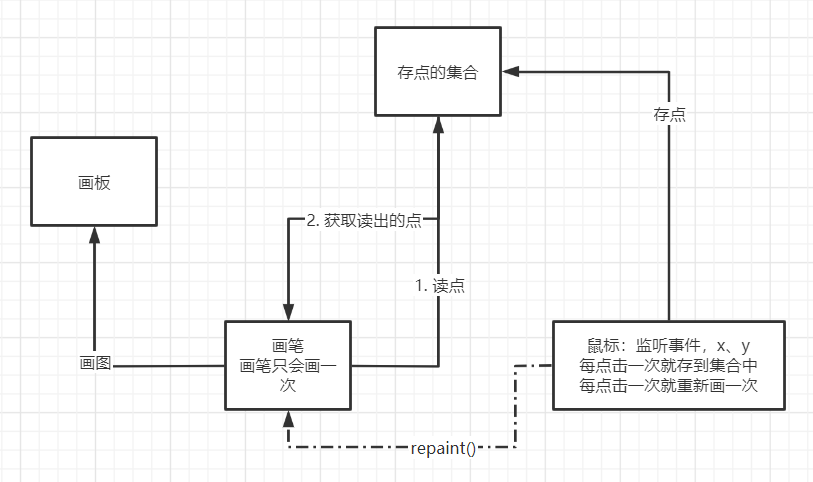
目的:想要实现鼠标画画

1
2
3
4
5
6
7
8
9
10
11
12
13
14
15
16
17
18
19
20
21
22
23
24
25
26
27
28
29
30
31
32
33
34
35
36
37
38
39
40
41
42
43
44
45
46
47
48
49
50
51
52
53
54
55
56
57
58
59
60
61
62
63
64
65
66
67
68
69
70
71
72
73
74
75
76
77
78
79
package com.kuangstudy.gui.module11;

import java.awt.*;
import java.awt.event.MouseAdapter;
import java.awt.event.MouseEvent;
import java.util.ArrayList;
import java.util.Iterator;

/**
* @author QeuroIzo
* @date 2021-03-05 21:54
* @TODO 测试鼠标监听事件
* @since
*/
public class TestMouseListener {
public static void main(String[] args) {
new MyFrame("画图");
}
}

class MyFrame extends Frame {
// 画画需要画笔,需要监听鼠标当前的位置,需要集合来存储这个点
/**
* 存鼠标点击的点
*/
private ArrayList<Point> points;
public MyFrame(String title) {
super(title);
setBounds(200, 200, 600, 500);
// 存鼠标的点
points = new ArrayList<>();
// points.add(new Point(100, 100));
points.add(new Point(0, 0));
// points.add(new Point(200, 200));
// points.add(new Point(300, 300));


// 鼠标监听器,针对这个窗口
this.addMouseListener(new MyMouseListener());

setVisible(true);
}

@Override
public void paint(Graphics g) {
// 画画需要监听鼠标的事件
Iterator iterator = points.iterator();
while (iterator.hasNext()) {
Point point = (Point) iterator.next();
g.setColor(Color.BLUE);
g.fillOval(point.x, point.y, 100, 100);
}
}

/**
* 添加一个点到界面上
*/
public void addPaint(Point point) {
points.add(point);
}

/**
* 适配器模式
*/
private class MyMouseListener extends MouseAdapter {
// 只需要鼠标按下、弹起、按住不放

@Override
public void mouseClicked(MouseEvent e) {
MyFrame myFrame = (MyFrame) e.getSource();
// 点击的时候,就会在界面上产生一个点!
// 这个点就是鼠标的点
myFrame.addPaint(new Point(e.getX(), e.getY()));

// 每次点击鼠标都需要重画一遍(《=》刷新),每秒刷新 30帧或60帧
myFrame.repaint();
}
}
}

代码的思维导图,下图:

窗口监听

关掉某个窗口:即隐藏这个窗口

1
2
3
4
5
6
7
8
9
10
11
12
13
14
15
16
17
18
19
20
21
22
23
24
25
26
27
28
29
30
31
32
33
34
35
36
37
38
39
40
41
42
43
44
45
46
47
48
49
50
51
52
53
54
55
56
57
58
59
60
61
62
63
64
65
66
67
68
69
70
71
72
73
74
75
76
77
78
79
80
81
82
83
package com.kuangstudy.gui.module12;

import java.awt.*;
import java.awt.event.WindowAdapter;
import java.awt.event.WindowEvent;

/**
* @author Qeuroal
* @date 2021-03-09 16:28
* @description
* @since
*/
public class TestWindowListener {
public static void main(String[] args) {
new WindowFrame();
}
}

class WindowFrame extends Frame {
public WindowFrame() {
setVisible(true);
setBounds(200, 300, 300, 400);
setBackground(Color.RED);
// addWindowListener(new MyWindowListener());
//最好使用匿名内部类
this.addWindowListener(new WindowAdapter() {
// 监听不到
// @Override
// public void windowOpened(WindowEvent e) {
// System.out.println("windowOpened");
// }

/**
* 关闭窗口
* @param e
*/
@Override
public void windowClosing(WindowEvent e) {
System.out.println("windowClosing");
System.exit(0);
}

// 监听不到
// @Override
// public void windowClosed(WindowEvent e) {
// System.out.println("windowClosed");
// }

/**
* 激活窗口
* @param e
*/
@Override
public void windowActivated(WindowEvent e) {
// 获取事件所作用的对象,(获得事件监听的对象)即你所与该事件绑定的控件,例如你点击了按钮,那么得到的source就是按钮对象了
WindowFrame source = (WindowFrame) e.getSource();
source.setTitle("被激活了");
System.out.println("windowActivated");
}

/**
* 未被激活窗口,即切出去了
* @param e
*/
@Override
public void windowDeactivated(WindowEvent e) {
System.out.println("windowDeactivated");
}
});
}

/** 成员内部类
class MyWindowListener extends WindowAdapter {
@Override
public void windowClosing(WindowEvent e) {
// 隐藏窗口,通过按钮隐藏窗口
setVisible(false);
// 正常退出:0,非正常退出:1
System.exit(0);
}
}
*/
}

键盘监听

1
2
3
4
5
6
7
8
9
10
11
12
13
14
15
16
17
18
19
20
21
22
23
24
25
26
27
28
29
30
31
32
33
34
35
36
37
38
39
40
41
42
package com.kuangstudy.gui.module13;

import java.awt.*;
import java.awt.event.KeyAdapter;
import java.awt.event.KeyEvent;

/**
* @author Qeuroal
* @date 2021-03-09 17:04
* @description
* @since
*/
public class TestKeyListener {
public static void main(String[] args) {
new KeyFrame();
}
}

class KeyFrame extends Frame {
public KeyFrame() {
setBounds(300, 400, 300, 400);
setVisible(true);

this.addKeyListener(new KeyAdapter() {
/**
* 键盘按下
* @param e
*/
@Override
public void keyPressed(KeyEvent e) {
// 获得键盘下的键是哪个,当前键盘的码
int keyCode = e.getKeyCode();
// 不需要记录这个数值,直接使用静态属性 VK_xxx
System.out.println(keyCode);
if (keyCode == KeyEvent.VK_UP) {
System.out.println("你按下了上键");
}
// 根据按下的不同操作,产生不同结果
}
});
}
}

Swing

AWT 是底层,Swing 是给封装了

窗口、面板

1
2
3
4
5
6
7
8
9
10
11
12
13
14
15
16
17
18
19
20
21
22
23
24
25
26
27
28
29
30
31
32
33
34
35
36
37
38
package com.kuangstudy.gui.module14;

import javax.swing.*;
import java.awt.*;

/**
* @author Qeuroal
* @date 2021-03-09 17:17
* @description
* @since
*/
public class TestJFrame {
/**
* 初始化
*/
public void init() {
// 顶级窗口
JFrame jf = new JFrame("这是一个JFrame窗口");
jf.setVisible(true);
jf.setBounds(100, 100, 400, 300);

// 设置文字: Jlabel
JLabel label = new JLabel("欢迎来到JAVA GUI");

jf.add(label);

// 容器:需要实例化,JFrame本身也是一个容器,需要实例化
Container contentPane = jf.getContentPane();
contentPane.setBackground(Color.RED);

// 关闭事件
jf.setDefaultCloseOperation(WindowConstants.EXIT_ON_CLOSE);
}
public static void main(String[] args) {
// 建立一个窗口
new TestJFrame().init();
}
}

标签居中

1
2
3
4
5
6
7
8
9
10
11
12
13
14
15
16
17
18
19
20
21
22
23
24
25
26
27
28
29
30
31
32
package com.kuangstudy.gui.module14;

import javax.swing.*;
import java.awt.*;

/**
* @author Qeuroal
* @date 2021-03-09 17:32
* @description
* @since
*/
public class TestJFrame2 {
public static void main(String[] args) {
new MyJFrame2().init();
}
}

class MyJFrame2 extends JFrame {
public void init() {
this.setVisible(true);
setBounds(300, 300, 400, 300);
// 设置文字: Jlabel
JLabel label = new JLabel("欢迎来到JAVA GUI");
// add(label) 和 this.add(label) 一样
add(label);
//设置水平对齐
label.setHorizontalAlignment(SwingConstants.CENTER);
// 获得一个容器
Container contentPane = this.getContentPane();
contentPane.setBackground(Color.RED);
}
}

弹窗

JDialog,用来被弹出,默认就有关闭事件

1
2
3
4
5
6
7
8
9
10
11
12
13
14
15
16
17
18
19
20
21
22
23
24
25
26
27
28
29
30
31
32
33
34
35
36
37
38
39
40
41
42
43
44
45
46
47
48
49
50
51
52
53
54
55
56
57
58
59
package com.kuangstudy.gui.module15;

import javax.swing.*;
import java.awt.*;
import java.awt.event.ActionEvent;
import java.awt.event.ActionListener;

/**
* @author Qeuroal
* @date 2021-03-09 20:46
* @description 主窗口
* @since
*/
public class TestDialog extends JFrame {
public TestDialog() {
this.setVisible(true);
this.setBounds(400, 400, 400, 300);
this.setDefaultCloseOperation(WindowConstants.EXIT_ON_CLOSE);

// JFrame放东西:容器
Container contentPane = this.getContentPane();
// 绝对布局
contentPane.setLayout(null);

// 按钮
JButton jButton = new JButton("点击弹出一个对话框");
jButton.setBounds(30, 30, 200, 50);

// 点击这个按钮的时候,弹出一个弹窗
jButton.addActionListener(new ActionListener() {
@Override
public void actionPerformed(ActionEvent e) {
// 弹窗
new MyDialogDemo();
}
});
contentPane.add(jButton);
}

public static void main(String[] args) {
new TestDialog();
}
}

/**
* 弹窗的窗口
*/
class MyDialogDemo extends JDialog{
public MyDialogDemo() {
this.setVisible(true);
this.setBounds(300, 300, 300, 200);
// this.setDefaultCloseOperation(WindowConstants.EXIT_ON_CLOSE);

Container contentPane = this.getContentPane();
contentPane.setLayout(null);

contentPane.add(new Label("学Swing"));
}
}

标签

label

  • 创建
1
new JLabel("xxx")
  • 实例
1
2
3
4
5
6
7
8
9
10
11
12
13
14
15
16
17
18
19
20
21
22
23
24
25
26
27
28
29
30
31
32
33
34
35
36
37
38
39
40
41
42
43
44
45
46
47
48
49
50
51
52
53
package com.kuangstudy.gui.module16;

import javax.swing.*;
import java.awt.*;

/**
* @author Qeuroal
* @date 2021-03-09 21:49
* @description 图标是一个接口,需要实现类,Frame继承
* @since
*/
public class TestIcon extends JFrame implements Icon {

public static void main(String[] args) {
// 首先生成TestIcon实例,通过这个实例再去生成新的TestIcon实例
new TestIcon().init();
}

private int width;
private int height;

public TestIcon() {}

public TestIcon(int width, int height) {
this.width = width;
this.height = height;
}

public void init() {
TestIcon testIcon = new TestIcon(30, 30);
// 图标放在标签上,也可以放在按钮上
JLabel iconTest = new JLabel("iconTest", testIcon, SwingConstants.CENTER);
Container contentPane = getContentPane();
contentPane.add(iconTest);
setVisible(true);
setDefaultCloseOperation(WindowConstants.EXIT_ON_CLOSE);
}

@Override
public void paintIcon(Component c, Graphics g, int x, int y) {
g.fillOval(x,y,width,height);
}

@Override
public int getIconWidth() {
return width;
}

@Override
public int getIconHeight() {
return height;
}
}

Icon

1
2
3
4
5
6
7
8
9
10
11
12
13
14
15
16
17
18
19
20
21
22
23
24
25
26
27
28
29
30
31
32
33
34
35
36
37
38
package com.kuangstudy.gui.module16;

import javax.swing.*;
import java.awt.*;
import java.net.URL;

/**
* @author Qeuroal
* @date 2021-03-09 22:14
* @description
* @since
*/
public class TestImageIcon extends JFrame {
public TestImageIcon() {
JLabel imageIconLabel = new JLabel("ImageIcon");
// 获取图片的地址
System.out.println(TestImageIcon.class);
URL resourceURL = TestImageIcon.class.getResource("/resource/xly2.png");
// 命名不要冲突了
ImageIcon imageIcon = new ImageIcon(resourceURL);

imageIconLabel.setIcon(imageIcon);
imageIconLabel.setHorizontalAlignment(SwingConstants.CENTER);

Container container = getContentPane();
container.add(imageIconLabel);

setVisible(true);
setDefaultCloseOperation(WindowConstants.EXIT_ON_CLOSE);
setBounds(100, 100, 300, 300);

}


public static void main(String[] args) {
new TestImageIcon();
}
}

面板

JPanel

1
2
3
4
5
6
7
8
9
10
11
12
13
14
15
16
17
18
19
20
21
22
23
24
25
26
27
28
29
30
31
32
33
34
35
36
37
38
39
40
41
42
43
44
package com.kuangstudy.gui.module17;

import javax.swing.*;
import java.awt.*;

/**
* @author Qeuroal
* @date 2021-03-09 22:36
* @description
* @since
*/
public class TestJPanel extends JFrame {
public TestJPanel() {
Container container = getContentPane();
//后面参数的意思是间距
container.setLayout(new GridLayout(2, 1, 10, 10));

JPanel panel1 = new JPanel(new GridLayout(1, 3));
JPanel panel2 = new JPanel(new GridLayout(1, 2));
JPanel panel3 = new JPanel(new GridLayout(2, 2));

panel1.add(new JButton("1"));
panel2.add(new JButton("2"));
panel3.add(new JButton("3"));

container.add(panel1);
container.add(panel2);
container.add(panel3);

setVisible(true);
setDefaultCloseOperation(WindowConstants.EXIT_ON_CLOSE);
setBounds(300, 300, 400, 300);
}

public static void main(String[] args) {
new TestJPanel();
}
}

JScrollPanel

1
2
3
4
5
6
7
8
9
10
11
12
13
14
15
16
17
18
19
20
21
22
23
24
25
26
27
28
29
30
31
32
33
package com.kuangstudy.gui.module17;

import javax.swing.*;
import java.awt.*;

/**
* @author Qeuroal
* @date 2021-03-09 22:45
* @description
* @since
*/
public class TestJScrollPanel extends JFrame {
public static void main(String[] args) {
new TestJScrollPanel();
}

public TestJScrollPanel() {
Container container = getContentPane();

// 文本域
JTextArea jTextArea = new JTextArea(20, 50);
jTextArea.setText("请输入文本");

// Scroll面板
JScrollPane jScrollPane = new JScrollPane(jTextArea);
container.add(jScrollPane);

setVisible(true);
setDefaultCloseOperation(WindowConstants.EXIT_ON_CLOSE);
setBounds(300, 300, 400, 30);
}
}

按钮

图片按钮

1
2
3
4
5
6
7
8
9
10
11
12
13
14
15
16
17
18
19
20
21
22
23
24
25
26
27
28
29
30
31
32
33
34
35
36
package com.kuangstudy.gui.module18;

import javax.swing.*;
import java.awt.*;
import java.net.URL;

/**
* @author Qeuroal
* @date 2021-03-15 22:34
* @description
* @since
*/
public class TestButton extends JFrame {

public TestButton() {
Container container = this.getContentPane();
// 将一个图片变为图标
URL resource = TestButton.class.getResource("/resource/xly2.png");
Icon imageIcon = new ImageIcon(resource);

// 把图标放在按钮上
JButton btn = new JButton();
btn.setIcon(imageIcon);
btn.setToolTipText("图片按钮");

// add
container.add(btn);
this.setVisible(true);
this.setDefaultCloseOperation(WindowConstants.EXIT_ON_CLOSE);
this.setBounds(300, 300, 400, 300);
}

public static void main(String[] args) {
new TestButton();
}
}

单选按钮

1
2
3
4
5
6
7
8
9
10
11
12
13
14
15
16
17
18
19
20
21
22
23
24
25
26
27
28
29
30
31
32
33
34
35
36
37
38
39
40
41
42
43
44
package com.kuangstudy.gui.module18;

import javax.swing.*;
import java.awt.*;
import java.net.URL;

/**
* @author Qeuroal
* @date 2021-03-15 22:42
* @description
* @since
*/
public class TestButton2 extends JFrame {

public TestButton2() {
Container container = this.getContentPane();
// 将一个图片变为图标
URL resource = TestButton.class.getResource("/resource/xly2.png");
Icon imageIcon = new ImageIcon(resource);

// 单选框
JRadioButton jRadioButton1 = new JRadioButton("JRadioButton1");
JRadioButton jRadioButton2 = new JRadioButton("JRadioButton2");
JRadioButton jRadioButton3 = new JRadioButton("JRadioButton3");

// 由于单选框只能选个一个,所以:分组,一个组中只能选一个
ButtonGroup buttonGroup = new ButtonGroup();
buttonGroup.add(jRadioButton1);
buttonGroup.add(jRadioButton2);
buttonGroup.add(jRadioButton3);

container.add(jRadioButton1, BorderLayout.CENTER);
container.add(jRadioButton2, BorderLayout.NORTH);
container.add(jRadioButton3, BorderLayout.SOUTH);

this.setVisible(true);
this.setDefaultCloseOperation(WindowConstants.EXIT_ON_CLOSE);
this.setBounds(300, 300, 400, 300);
}

public static void main(String[] args) {
new TestButton2();
}
}

复选按钮

1
2
3
4
5
6
7
8
9
10
11
12
13
14
15
16
17
18
19
20
21
22
23
24
25
26
27
28
29
30
31
32
33
34
35
36
package com.kuangstudy.gui.module18;

import javax.swing.*;
import java.awt.*;
import java.net.URL;

/**
* @author Qeuroal
* @date 2021-03-15 22:48
* @description
* @since
*/
public class TestButton3 extends JFrame {

public TestButton3() {
Container container = this.getContentPane();
// 将一个图片变为图标
URL resource = TestButton.class.getResource("/resource/xly2.png");
Icon imageIcon = new ImageIcon(resource);

// 多选框
JCheckBox jCheckBox1 = new JCheckBox("jCheckBox1");
JCheckBox jCheckBox2 = new JCheckBox("jCheckBox2");

container.add(jCheckBox1, BorderLayout.NORTH);
container.add(jCheckBox2, BorderLayout.SOUTH);

this.setVisible(true);
this.setDefaultCloseOperation(WindowConstants.EXIT_ON_CLOSE);
this.setBounds(300, 300, 400, 300);
}

public static void main(String[] args) {
new TestButton3();
}
}

列表

下拉框

1
2
3
4
5
6
7
8
9
10
11
12
13
14
15
16
17
18
19
20
21
22
23
24
25
26
27
28
29
30
31
32
33
package com.kuangstudy.gui.module19;

import javax.swing.*;
import java.awt.*;

/**
* @author Qeuroal
* @date 2021-03-15 22:53
* @description
* @since
*/
public class TestCombobox extends JFrame {
public TestCombobox() {
super("TestCombobox");
Container container = this.getContentPane();

JComboBox status = new JComboBox();
status.addItem(null);
status.addItem("正在热播");
status.addItem("已下架");
status.addItem("即将上映");

container.add(status);

setVisible(true);
setBounds(300, 300, 500, 300);
setDefaultCloseOperation(WindowConstants.EXIT_ON_CLOSE);
}

public static void main(String[] args) {
new TestCombobox();
}
}

列表框

1
2
3
4
5
6
7
8
9
10
11
12
13
14
15
16
17
18
19
20
21
22
23
24
25
26
27
28
29
30
31
package com.kuangstudy.gui.module19;

import javax.swing.*;
import java.awt.*;

/**
* @author Qeuroal
* @date 2021-03-15 23:03
* @description
* @since
*/
public class TestCombobox2 extends JFrame {
public TestCombobox2() {
super("TestCombobox");
Container container = this.getContentPane();

// 生成列表的内容
String[] contents = {"1", "2", "3"};

JList jList = new JList(contents);
container.add(jList);

setVisible(true);
setBounds(300, 300, 500, 300);
setDefaultCloseOperation(WindowConstants.EXIT_ON_CLOSE);
}

public static void main(String[] args) {
new TestCombobox2();
}
}
  • 应用场景
    • 下拉框:选择地区,或者一些单个选项
    • 列表框:展示信息,一般是动态扩容

文本框

文本框

1
2
3
4
5
6
7
8
9
10
11
12
13
14
15
16
17
18
19
20
21
22
23
24
25
26
27
28
29
30
31
32
33
34
package com.kuangstudy.gui.module20;

import javax.swing.*;
import java.awt.*;

/**
* @author Qeuroal
* @date 2021-03-15 23:11
* @description
* @since
*/
public class TestText extends JFrame {
public TestText() {
super("TestCombobox");
Container container = this.getContentPane();
container.setLayout(null);

JTextField jTextField1 = new JTextField("hello");
JTextField jTextField2 = new JTextField("world", 20);

// 东西南北中布局,会自动填充满
container.add(jTextField1, BorderLayout.NORTH);
container.add(jTextField2, BorderLayout.SOUTH);


setVisible(true);
setBounds(300, 300, 500, 300);
setDefaultCloseOperation(WindowConstants.EXIT_ON_CLOSE);
}

public static void main(String[] args) {
new TestText();
}
}

密码框

1
2
3
4
5
6
7
8
9
10
11
12
13
14
15
16
17
18
19
20
21
22
23
24
25
26
27
28
29
30
31
32
package com.kuangstudy.gui.module20;

import javax.swing.*;
import java.awt.*;

/**
* @author Qeuroal
* @date 2021-03-15 23:14
* @description
* @since
*/
public class TestText2 extends JFrame {
public TestText2() {
super("TestCombobox");
Container container = this.getContentPane();

// 默认 ····
JPasswordField jPasswordField = new JPasswordField();
// 手动设置 ***
jPasswordField.setEchoChar('*');

container.add(jPasswordField);

setVisible(true);
setBounds(300, 300, 500, 300);
setDefaultCloseOperation(WindowConstants.EXIT_ON_CLOSE);
}

public static void main(String[] args) {
new TestText2();
}
}

文本域

1
2
3
4
5
6
7
8
9
10
11
12
13
14
15
16
17
18
19
20
21
22
23
24
25
26
27
28
29
30
31
32
package com.kuangstudy.gui.module17;

import javax.swing.*;
import java.awt.*;

/**
* @author Qeuroal
* @date 2021-03-09 22:45
* @description
* @since
*/
public class TestJScrollPanel extends JFrame {
public static void main(String[] args) {
new TestJScrollPanel();
}

public TestJScrollPanel() {
Container container = getContentPane();

// 文本域
JTextArea jTextArea = new JTextArea(20, 50);
jTextArea.setText("请输入文本");

// Scroll面板
JScrollPane jScrollPane = new JScrollPane(jTextArea);
container.add(jScrollPane);

setVisible(true);
setDefaultCloseOperation(WindowConstants.EXIT_ON_CLOSE);
setBounds(300, 300, 400, 30);
}
}

游戏实践:贪吃蛇

如果时间片足够小,就是动画:一秒30帧(人眼就是动画了)

连起来是动画,拆开就是静态的图片。如:动漫,1秒24张画

键盘监听

定时器 Timer

代码

StartGame

1
2
3
4
5
6
7
8
9
10
11
12
13
14
15
16
17
18
19
20
21
22
23
24
25
26
package com.kuangstudy.gui.snake;

import javax.swing.*;

/**
* @author Qeuroal
* @date 2021-03-15 23:29
* @description 游戏的主启动类
* @since
*/
public class StartGame {
public static void main(String[] args) {
JFrame frame = new JFrame();

// 是算出来的,不能被拉伸,否则就会变形了
frame.setBounds(200, 100, 900, 720);
// 窗口大小不可变
frame.setResizable(false);
frame.setDefaultCloseOperation(WindowConstants.EXIT_ON_CLOSE);

// 整车游戏界面都在面板上
frame.add(new GamePanel());

frame.setVisible(true);
}
}

GamePanel

1
2
3
4
5
6
7
8
9
10
11
12
13
14
15
16
17
18
19
20
21
22
23
24
25
26
27
28
29
30
31
32
33
34
35
36
37
38
39
40
41
42
43
44
45
46
47
48
49
50
51
52
53
54
55
56
57
58
59
60
61
62
63
64
65
66
67
68
69
70
71
72
73
74
75
76
77
78
79
80
81
82
83
84
85
86
87
88
89
90
91
92
93
94
95
96
97
98
99
100
101
102
103
104
105
106
107
108
109
110
111
112
113
114
115
116
117
118
119
120
121
122
123
124
125
126
127
128
129
130
131
132
133
134
135
136
137
138
139
140
141
142
143
144
145
146
147
148
149
150
151
152
153
154
155
156
157
158
159
160
161
162
163
164
165
166
167
168
169
170
171
172
173
174
175
176
177
178
179
180
181
182
183
184
185
186
187
188
189
190
191
192
193
194
195
196
197
198
199
200
201
202
203
204
205
206
207
208
209
210
211
212
213
214
215
216
217
218
219
220
221
222
223
224
225
226
227
228
229
230
231
package com.kuangstudy.gui.snake;

import javax.swing.*;
import java.awt.*;
import java.awt.event.ActionEvent;
import java.awt.event.ActionListener;
import java.awt.event.KeyEvent;
import java.awt.event.KeyListener;
import java.util.Random;

/**
* @author Qeuroal
* @date 2021-03-15 23:32
* @description 游戏的面板
* @since
*/
public class GamePanel extends JPanel implements KeyListener, ActionListener {

/**
* 定义蛇的数据结构
*/
// 蛇的长度
int length;
// 蛇的x坐标 25*25
int[] snakeX = new int[100];
// 蛇的Y坐标 25*25
int[] snakeY = new int[100];
// 初始方向
String fx;
// 游戏当前状态:开始,停止
boolean isStart= false;
// 食物的坐标
int foodX;
int foodY;
Random random = new Random();
// 积分
int score;
// 游戏失败状态
boolean isFail = false;
// 定时器:ms为单位,监听this这个对象。100毫秒执行一次。
Timer timer = new Timer(100, this);
/**
* 构造器
*/
public GamePanel() {
init();
// 获得焦点事件
this.setFocusable(true);
// 获取键盘事件
this.addKeyListener(this);
// 游戏一开始定时器就启动
timer.start();
}


/**
* 初始化方法
*/
public void init() {
length = 3;
// 脑袋的坐标
snakeX[0] = 100; snakeY[0] = 100;
// 第一个身体的坐标
snakeX[1] = 75; snakeY[1] = 100;
// 第二个身体的坐标
snakeX[2] = 50; snakeY[2] = 100;
fx = "R";
// 把食物随机放在界面上
foodX = 25 + 25 * random.nextInt(34);
foodY = 75 + 25 * random.nextInt(24);
// 积分
score = 0;
}


/**
* 绘制面板,我们游戏中的所有东西,都是用这个笔来画
* @param g
*/
@Override
protected void paintComponent(Graphics g) {
// 清屏
super.paintComponent(g);
setBackground(Color.WHITE);
// 绘制静态面板,头部广告栏画上去
Data.header.paintIcon(this, g, 25, 11);
// 默认的游戏界面
g.fillRect(25, 75, 850, 600);

// 画积分
g.setColor(Color.WHITE);
g.setFont(new Font("微软雅黑", Font.BOLD, 15));
g.drawString("长度: " + length,750, 35 );
g.drawString("分数: " + score, 750, 50);

// 画食物
Data.food.paintIcon(this, g, foodX, foodY);

// 把小蛇画上去
if (fx.equals("R")) {
Data.right.paintIcon(this, g, snakeX[0], snakeY[0]);
} else if (fx.equals("L")) {
Data.left.paintIcon(this, g, snakeX[0], snakeY[0]);
} else if (fx.equals("U")) {
Data.up.paintIcon(this, g, snakeX[0], snakeY[0]);
} else if (fx.equals("D")) {
Data.down.paintIcon(this, g, snakeX[0], snakeY[0]);
}
for (int i = 1; i < length; i++) {
Data.body.paintIcon(this, g, snakeX[i], snakeY[i]);
}

// 游戏状态
if (isStart == false) {
g.setColor(Color.WHITE);
// 设置字体
g.setFont(new Font("微软雅黑", Font.BOLD, 40));
g.drawString("按下空格开始游戏", 300, 300);
}

if (isFail) {
g.setColor(Color.RED);
// 设置字体
g.setFont(new Font("微软雅黑", Font.BOLD, 40));
g.drawString("失败,按下空格重新开始游戏", 300, 300);
}
}


/**
* 键盘监听事件
* @param e
*/
@Override
public void keyPressed(KeyEvent e) {
// 获得键盘按键是哪一个
int keyCode = e.getKeyCode();
// 如果按下的是空格键
if (keyCode == KeyEvent.VK_SPACE) {
if (isFail) {
// 重新开始
isFail = false;
init();
} else {
isStart = !isStart;
}
repaint();

}
// 小蛇移动
if (keyCode == KeyEvent.VK_UP) {
fx = "U";
} else if (keyCode == KeyEvent.VK_DOWN) {
fx = "D";
} else if (keyCode == KeyEvent.VK_LEFT) {
fx = "L";
} else if (keyCode == KeyEvent.VK_RIGHT) {
fx = "R";
}
}

@Override
public void keyReleased(KeyEvent e) {
}
@Override
public void keyTyped(KeyEvent e) {
}

/**
* 事件监听——需要通过固定事件来刷新:10次/1s
* @param e
*/
@Override
public void actionPerformed(ActionEvent e) {
// 如果游戏是开始状态,就让小蛇动起来
if (isStart && isFail == false) {
// 吃食物
if (snakeX[0] == foodX && snakeY[0] == foodY) {
// 长度+1
length++;
// 分数+10
score += 10;
// 重新生成食物
foodX = 25 + 25 * random.nextInt(34);
foodY = 75 + 25 * random.nextInt(24);
}

// 移动:后一节移到前一节的位置
for (int i = length - 1; i > 0; i--) {
snakeX[i] = snakeX[i - 1];
snakeY[i] = snakeY[i - 1];
}
// 走向
if (fx.equals("R")) {
snakeX[0] += 25;
// 边界判断
if (snakeX[0] > 850) {
snakeX[0] = 25;
}
} else if (fx.equals("L")){
snakeX[0] -= 25;
if (snakeX[0] < 25) {
snakeX[0] = 850;
}
} else if (fx.equals("U")){
snakeY[0] -= 25;
if (snakeY[0] < 75) {
snakeY[0] = 650;
}
} else if (fx.equals("D")){
snakeY[0] += 25;
if (snakeY[0] > 650) {
snakeY[0] = 75;
}
}

// 失败判定:撞到自己就算失败
for (int i = 1; i < length; i++) {
if (snakeX[0] == snakeX[i] && snakeY[0] == snakeY[i]) {
isFail = true;
}
}

// 重画页面
repaint();
}
// 定时器开始
timer.start();
}
}

总结

补充

C/S:客户端+服务器 (主流:C++)

B/S:浏览器+服务器 (主流:Java)