144. Pytorch
基本概念
简介
模型训练5要素
- 数据:包括数据读取,数据清洗,进行数据划分和数据预处理,比如读取图片如何预处理及数据增强。
- 模型:包括构建模型模块,组织复杂网络,初始化网络参数,定义网络层。
- 损失函数:包括创建损失函数,设置损失函数超参数,根据不同任务选择合适的损失函数。
- 优化器:包括根据梯度使用某种优化器更新参数,管理模型参数,管理多个参数组实现不同学习率,调整学习率。
- 迭代训练:组织上面 4 个模块进行反复训练。包括观察训练效果,绘制 Loss/Accuracy 曲线,用 TensorBoard 进行可视化分析
张量
概念
张量
官方定义
A tensor is the primary data structure used by neural networks.
官方定义2
A PyTorch Tensor is conceptually identical to a numpy array: a Tensor is an n-dimensional array, and PyTorch provides many functions for operating on these Tensors.
通俗理解
多维数组(Tensors and nd-arrays are the same thing! So tensors are multidimensional arrays or nd-arrays for short.)
| Indexes required | Computer science | Mathematics |
|---|---|---|
| n | nd-array | nd-tensor |
- A scalar is a $0$ dimensional tensor
- A vector is a $1$ dimensional tensor
- A matrix is a $2$ dimensional tensor
- A nd-array is an $n$ dimensional tensor
拓展
We often see this kind of thing where different areas of study use different words for the same concept.
索引
obvious: 访问一个多维数组, 需要几个索引
秩
即维数,或者说在张量中访问一个元素,需要的索引数
A tensor’s rank tells us how many indexes are needed to refer to a specific element within the tensor.
轴
An axis of a tensor is a specific dimension of a tensor.
tensor 属性
torch.dtype
| Data type | dtype | CPU tensor | GPU tensor |
|---|---|---|---|
| 32-bit floating point | torch.float32 | torch.FloatTensor | torch.cuda.FloatTensor |
| 64-bit floating point | torch.float64 | torch.DoubleTensor | torch.cuda.DoubleTensor |
| 16-bit floating point | torch.float16 | torch.HalfTensor | torch.cuda.HalfTensor |
| 8-bit integer (unsigned) | torch.uint8 | torch.ByteTensor | torch.cuda.ByteTensor |
| 8-bit integer (signed) | torch.int8 | torch.CharTensor | torch.cuda.CharTensor |
| 16-bit integer (signed) | torch.int16 | torch.ShortTensor | torch.cuda.ShortTensor |
| 32-bit integer (signed) | torch.int32 | torch.IntTensor | torch.cuda.IntTensor |
| 64-bit integer (signed) | torch.int64 | torch.LongTensor | torch.cuda.LongTensor |
torch.device
类型
- CPU
- GPU
指定GPU
1 | device = torch.device('cuda:0') |
注意
One thing to keep in mind about using multiple devices is that tensor operations between tensors must happen between tensors that ==exists on the same device==.
torch.layout
应该就是步长==?????==
总览
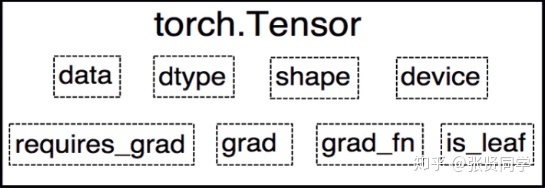
- data: 被包装的 Tensor。
- grad: data 的梯度。
- grad_fn: 创建 Tensor 所使用的 Function,是自动求导的关键,因为根据所记录的函数才能计算出导数。
- requires_grad: 指示是否需要梯度,并不是所有的张量都需要计算梯度。
- is_leaf: 指示是否叶子节点(张量),叶子节点的概念在计算图中会用到,后面详细介绍。
- dtype: 张量的数据类型,如 torch.FloatTensor,torch.cuda.FloatTensor。
- shape: 张量的形状。如 (64, 3, 224, 224)
- device: 张量所在设备 (CPU/GPU),GPU 是加速计算的关键
构建tensor的方法
直接构造tensor
torch.Tensor(data)torch.tensor(data)torch.as_tensor(data)torch.from_numpy(data)
根据数值构造tensor
torch.eye(k): 生成 k 阶的单位矩阵torch.zeros(shape): 生成元素值都为 0, 形状为 shape 的张量torch.zeros_like(input, dtype=None, layout=None, device=None, requires_grad=False, memory_format=torch.preserve_format): 根据 input 形状创建全 0 张量torch.ones(shape): 生成元素值都为 1, 形状为 shape 的张量torch.rand(shape): 生成元素值随机, 形状为 shape 的张量torch.full()1
torch.full(size, fill_value, out=None, dtype=None, layout=torch.strided, device=None, requires_grad=False)
- size: 张量的形状,如 (3,3)
- fill_value: 张量中每一个元素的值
torch.full_like()1
torch.full_like(input, fill_value, dtype=None, layout=torch.strided, device=None, requires_grad=False, memory_format=torch.preserve_format) → Tensor
- input: the size of
inputwill determine size of the output tensor. - fill_value: the number to fill the output tensor with.
- input: the size of
torch.arange(): 创建等差的 1 维张量。注意区间为 $[start, end)$1
torch.arange(start=0, end, step=1, out=None, dtype=None, layout=torch.strided, device=None, requires_grad=False)
- start: 数列起始值
- end: 数列结束值,开区间,取不到结束值
- step: 数列公差,默认为 1
torch.linspace(): 创建均分的 1 维张量。数值区间为 $[start, end]$1
torch.linspace(start, end, steps=100, out=None, dtype=None, layout=torch.strided, device=None, requires_grad=False)
- start: 数列起始值
- end: 数列结束值
- steps: 数列长度 (元素个数)
touch.logspace(): 创建对数均分的 1 维张量, 数值区间为 $[start, end]$, 底为 base1
torch.logspace(start, end, steps=100, base=10.0, out=None, dtype=None, layout=torch.strided, device=None, requires_grad=False)
- start: 数列起始值
- end: 数列结束值
- steps: 数列长度 (元素个数)
- base: 对数函数的底,默认为 10
根据概率构造tensor
torch.normal(mean, std, *, generator=None, out=None): 生成正态分布 (高斯分布)- mean: 均值
- std: 标准差
4种模式
mean 为标量, std 为标量, 则==需要设置 size==
如:
torch.normal(0., 1., size=(4,))mean 为标量,std 为张量
mean 为张量,std 为标量
mean 为张量,std 为张量
torch.randn()和torch.randn_like(): 生成标准正态分布。1
torch.randn(*size, out=None, dtype=None, layout=torch.strided, device=None, requires_grad=False)
- size: 张量的形状
torch.rand()和torch.rand_like(): 在区间 $[0, 1)$ 上生成均匀分布1
torch.rand(*size, out=None, dtype=None, layout=torch.strided, device=None, requires_grad=False)
torch.randint()和torch.randint_like(): 在区间 $[low, high)$ 上生成整数均匀分布1
randint(low=0, high, size, *, generator=None, out=None, dtype=None, layout=torch.strided, device=None, requires_grad=False)
- size: 张量的形状
torch.randperm():生成从 0 到 n-1 的随机排列。常用于生成索引。1
torch.randperm(n, out=None, dtype=torch.int64, layout=torch.strided, device=None, requires_grad=False)
- n: 张量的长度
torch.bernoulli()
1
torch.bernoulli(input, *, generator=None, out=None)
功能:以 input 为概率,生成伯努利分布 (0-1 分布,两点分布)
- input: 概率值
使用data的构造方法的不同
输出不同对比
code
1 | data = np.array([1, 2, 3], dtype=np.int32) |
output
1 | numpy: [1 2 3] ; dtype: int32 |
数据类型对比
torch.Tensor(data)
| 数据 | 数据类型 |
|---|---|
| tensor([1., 2., 3.]) | torch.float32 |
torch.tensor(data)
| 数据 | 数据类型 |
|---|---|
| tensor([1, 2, 3], dtype=torch.int32) | torch.int32 |
torch.as_tensor(data)
| 数据 | 数据类型 |
|---|---|
| tensor([1, 2, 3], dtype=torch.int32) | torch.int32 |
torch.from_numpy(data)
| 数据 | 数据类型 |
|---|---|
| tensor([1, 2, 3], dtype=torch.int32) | torch.int32 |
本质的不同
torch.Tensor() 和 torch.tensor()
torch.Tensor(data)这是构造函数
torch.tensor(data)这是工厂函数
You can think of the
torch.tensor()function as a factory that builds tensors given some parameter inputs.相比于
torch.Tensor(data)更好the factory function
torch.tensor()has better documentation and more configuration options, so it gets the winning spot at the moment.
dtype 的对比
``torch.Tensor()`
使用的是默认类型
注意: 这个函数中的dtype也而==不可以==显式的设置, 如:
torch.Tensor(data, dtype=torch.int32)❎other(
torch.tensor(), torch.as_tensor(), torch.from_numpy())使用的是推断类型(根据传入的原始数据, 自动推断出元素的类型)
注意: 这些函数中的dtype也而可以显式的设置, 如:
torch.tensor(data, dtype=torch.float32)
内存对比: copy vs share
代码
1 | data = np.array([1, 2, 3], dtype=np.int32) |
out:
1 | old: |
总结
| Share Data | Copy Data |
|---|---|
| torch.as_tensor() | torch.tensor() |
| torch.from_numpy() | torch.Tensor() |
- This sharing just means that the actual data in memory exists in a single place
- Sharing data is more efficient and uses less memory than copying data because the data is not written to two locations in memory.
torch.as_tensor() 和 torch.from_numpy() 的选择
- The
torch.from_numpy()function only acceptsnumpy.ndarrays - the
torch.as_tensor()function accepts a wide variety ofarray-like objectsincluding other PyTorch tensors
张量操作
拼接
torch.cat()
将张量按照 dim 维度进行拼接
1 | torch.cat(tensors, dim=0, out=None) |
- tensors: 张量序列
- dim: 要拼接的维度
torch.stack()
将张量在新创建的 dim 维度上进行拼接
1 | torch.stack(tensors, dim=0, out=None) |
- tensors: 张量序列
- dim: 要拼接的维度
意义
使用stack可以保留两个信息:[1. 序列] 和 [2. 张量矩阵] 信息,属于【==扩张==再拼接】的函数
例子
1 | # 假设是时间步T1 |
切分
torch.chunk()
1 | torch.chunk(input, chunks, dim=0) |
功能:将张量按照维度 dim 进行平均切分。若不能整除,则最后一份张量小于其他张量。
- input: 要切分的张量
- chunks: 要切分的份数
- dim: 要切分的维度
torch.split()
1 | torch.split(tensor, split_size_or_sections, dim=0) |
功能:将张量按照维度 dim 进行平均切分。可以指定每一个分量的切分长度。
- tensor: 要切分的张量
- split_size_or_sections:
- 为 int 时,表示每一份的长度,如果不能被整除,则最后一份张量小于其他张量;
- 为 list 时,按照 list 元素作为每一个分量的长度切分。如果 list 元素之和不等于切分维度 (dim) 的值,就会报错。
- dim: 要切分的维度
索引
torch.index_select()
1 | torch.index_select(input, dim, index, out=None) |
功能:在维度 dim 上,按照 index 索引取出数据拼接为张量返回。
- input: 要索引的张量
- dim: 要索引的维度
- index: 要索引数据的序号
torch.mask_select()
1 | torch.masked_select(input, mask, out=None) |
功能:按照 mask 中的 True 进行索引拼接得到一维张量返回。
- 要索引的张量
- mask: 与 input 同形状的布尔类型张量
t.le() t.ge()
1 | t.le(5) |
变换
torch.reshape()
1 | torch.reshape(input, shape) |
功能:变换张量的形状。当张量在内存中是连续时,返回的张量和原来的张量共享数据内存,改变一个变量时,另一个变量也会被改变。
- input: 要变换的张量
- shape: 新张量的形状
-1表示这个维度是根据其他维度计算得出的
torch.transpose()
1 | torch.transpose(input, dim0, dim1) |
功能:交换张量的两个维度。常用于图像的变换,比如把 $chw$ 变换为 $hwc$。
- input: 要交换的变量
- dim0: 要交换的第一个维度
- dim1: 要交换的第二个维度
torch.t()
功能:2 维张量转置,对于 2 维矩阵而言,等价于torch.transpose(input, 0, 1)。
torch.squeeze()
1 | torch.squeeze(input, dim=None, out=None) |
功能:压缩长度为 1 的维度。
- dim: 若为 None,则移除所有长度为 1 的维度;若指定维度,则==当且仅当该维度长度为 1 时可以移除==。
torch.unsqueeze()
1 | torch.unsqueeze(input, dim) |
功能:根据 dim 扩展维度,长度为 1。
数学运算
torch.add()
1 | torch.add(input, other, out=None) |
功能:逐元素计算 input + alpha * other。因为在深度学习中经常用到先乘后加的操作。
- input: 第一个张量
- alpha: 乘项因子
- other: 第二个张量
torch.addcdiv()
1 | torch.addcdiv(input, tensor1, tensor2, *, value=1, out=None) |
计算公式: $out_i = input_i + value \times \frac{tensor1_i}{tensor2_i}$
torch.addcmul()
1 | torch.addcmul(input, tensor1, tensor2, *, value=1, out=None) |
计算公式: $out_i = input_i + value \times tensor1_i \times tensor2_i$
bridge with Numpy
Tensor to numpy array
1 | tensor.numpy() |
函数
获取torch默认类型函数
1 | torch.get_default_dtype() |
suffix “_”
在函数的后面加上后缀 _, 将会改变作用的数据
示例
1 | # source tensor |
out
1 | tensor([[1., 0., 0., 0., 0.], |
自动求导(autograd)
只要搭建好前向计算图,利用 torch.autograd 自动求导得到所有张量的梯度
torch.autograd.backward()
1 | torch.autograd.backward(tensors, grad_tensors=None, retain_graph=None, create_graph=False, grad_variables=None) |
功能
- 自动求取梯度
参数
tensors: 用于求导的张量,如 lossretain_graph: 保存计算图。PyTorch 采用动态图机制,默认每次反向传播之后都会释放计算图。这里设置为 True 可以不释放计算图。y.backward()方法调用的是torch.autograd.backward(self, gradient, retain_graph, create_graph)。但是在第二次执行y.backward()时会出错。因为 PyTorch 默认是每次求取梯度之后不保存计算图的,因此第二次求导梯度时,计算图已经不存在了。在第一次求梯度时使用y.backward(retain_graph=True)即可。create_graph: 创建导数计算图,用于高阶求导grad_tensors: 多梯度权重。当有多个 loss 混合需要计算梯度时,设置每个 loss 的权重。
retain_grad 参数
反向传播结束之后仍然需要保留非叶子节点的梯度
grad_tensors 参数
给 loss 设置权重
torch.autograd.grad()
1 | torch.autograd.grad(outputs, inputs, grad_outputs=None, retain_graph=None, create_graph=False, only_inputs=True, allow_unused=False) |
功能
求取梯度
参数
- outputs: 用于求导的张量,如 loss
- inputs: 需要梯度的张量
- create_graph: 创建导数计算图,用于高阶求导
- retain_graph:保存计算图
- grad_outputs: 多梯度权重计算
返回值
返回结果是一个 tunple,需要取出第 0 个元素才是真正的梯度。
注意点
在每次反向传播求导时,计算的梯度不会自动清零。如果进行多次迭代计算梯度而没有清零,那么梯度会在前一次的基础上叠加。
故使用
w.grad.zero()将梯度清零依赖与叶子节点的节点,
requires_grad属性默认为True叶子节点不可以执行
inplace操作1
2
3
4
5
6
7## inplace 操作: 改变后的值和原来的值内存地址是同一个
a += x
a.add_(x)
## 非inplace 操作: 改变后的值和原来的值内存地址不是同一个
a = a + x
a.add(x)举例
1
2
3
4
5
6
7
8
9
10
11
12
13print("非 inplace 操作")
a = torch.ones((1, ))
print(id(a), a)
# 非 inplace 操作,内存地址不一样
a = a + torch.ones((1, ))
print(id(a), a)
print("inplace 操作")
a = torch.ones((1, ))
print(id(a), a)
# inplace 操作,内存地址一样
a += torch.ones((1, ))
print(id(a), a)结果自己跑一下嘛
问题
如果在反向传播之前
inplace改变了叶子的值, 再执行backward()会报错
逻辑回归
概念
二分类模型
模型表达式 $y=f(z)=\frac{1}{1+e^{-z}}$,其中 $z=WX+b$。$f(z)$ 称为 sigmoid 函数,也被称为 Logistic 函数
分类原则
逻辑回归是在线性回归的基础上加入了一个 sigmoid 函数,这是为了更好地描述置信度,把输入映射到 (0,1) 区间中,符合概率取值。
训练步骤
导入模型
计算误差 loss
后向传播 (call
loss.backward())加载优化器 optimizer: 注册模型中的所有参数
梯度下降 (call
optim.step())各参数的梯度保存在
.grad属性中
反向传播
To backpropagate the error all we have to do is to loss.backward(). You need to clear the existing gradients though, ==else gradients will be accumulated to existing gradients.==
模型构建总结
步骤
- 加载数据
- 定义神经网络
- 定义损失函数
- 训练网络
- 测试网络
PyTorch 构建模型需要 5 大步骤:
- 数据:包括数据读取,数据清洗,进行数据划分和数据预处理,比如读取图片如何预处理及数据增强。
- 模型:包括构建模型模块,组织复杂网络,初始化网络参数,定义网络层。
- 损失函数:包括创建损失函数,设置损失函数超参数,根据不同任务选择合适的损失函数。
- 优化器:包括根据梯度使用某种优化器更新参数,管理模型参数,管理多个参数组实现不同学习率,调整学习率。
- 迭代训练:组织上面 4 个模块进行反复训练。包括观察训练效果,绘制 Loss/ Accuracy 曲线,用 TensorBoard 进行可视化分析。
数据
数据模块
细分
- 数据收集: 样本和标签
- 数据划分: 训练集, 验证集和测试集
- 数据读取:对应于PyTorch 的 DataLoader。其中 DataLoader 包括 Sampler 和 DataSet。Sampler 的功能是生成索引, DataSet 是根据生成的索引读取样本以及标签。
- 数据预处理:对应于 PyTorch 的 transforms
考虑
- Who created the dataset?
- How was the dataset created?
- What transformations were used?
- What intent does the dataset have?
- Possible unintentional consequences?
- Is the dataset biased?
- Are there ethical issues with the dataset?
DataLoader
torch.utils.data.DataLoader()
1 | torch.utils.data.DataLoader(dataset, batch_size=1, shuffle=False, sampler=None, batch_sampler=None, num_workers=0, collate_fn=None, pin_memory=False, drop_last=False, timeout=0, worker_init_fn=None, multiprocessing_context=None) |
功能
构建可迭代的装载器
参数
- dataset: Dataset 类,决定数据从哪里读取以及如何读取
- batchsize: 批大小
- num_works: 是否多进程读取数据
- sheuffle: 每个 epoch 是否乱序
- drop_last: 当样本数不能被 batchsize 整除时,是否舍弃最后一批数据
Epoch, I’t’eration, Batchsize
- Epoch: ==所有训练样本==都已经输入到模型中,称为一个 Epoch
- Iteration: ==一批样本==输入到模型中,称为一个 Iteration
- Batchsize: ==批大小==,决定一个 iteration 有多少样本,也决定了一个 Epoch 有多少个 Iteration
举例: 假设样本总数有 80,设置 Batchsize 为 8,则共有 $80 \div 8=10$ 个 Iteration。这里 $1 Epoch = 10 Iteration$。
torch.utils.data.Dataset
功能
Dataset 是抽象类,所有自定义的 Dataset 都需要继承该类,并且重写__getitem()__方法和__len__()方法
__getitem()__方法的作用是接收一个索引,返回索引对应的样本和标签,这是我们自己需要实现的逻辑__len__()方法是返回所有样本的数量
数据读取
- 读取哪些数据:每个 Iteration 读取一个 Batchsize 大小的数据,每个 Iteration 应该读取哪些数据。
- 从哪里读取数据:如何找到硬盘中的数据,应该在哪里设置文件路径参数
- 如何读取数据:不同的文件需要使用不同的读取方法和库。
步骤
- 划分数据集为: 训练集, 验证集和测试集, 比例为 $8 : 1 : 1$, 并构造路径
- 实现
get_img_info()和__getitem__(self, index),__len__()函数 - 构建模型
DataSet
MNIST 数据集
损失函数
均方误差 MSE
$MSE = \frac{1}{m}\sum_{i = 1}^{m}{(y_i-\hat{y_i})^2}$
- $y_i$ 是预测值
- $\hat{y_i}$ 是真实值